
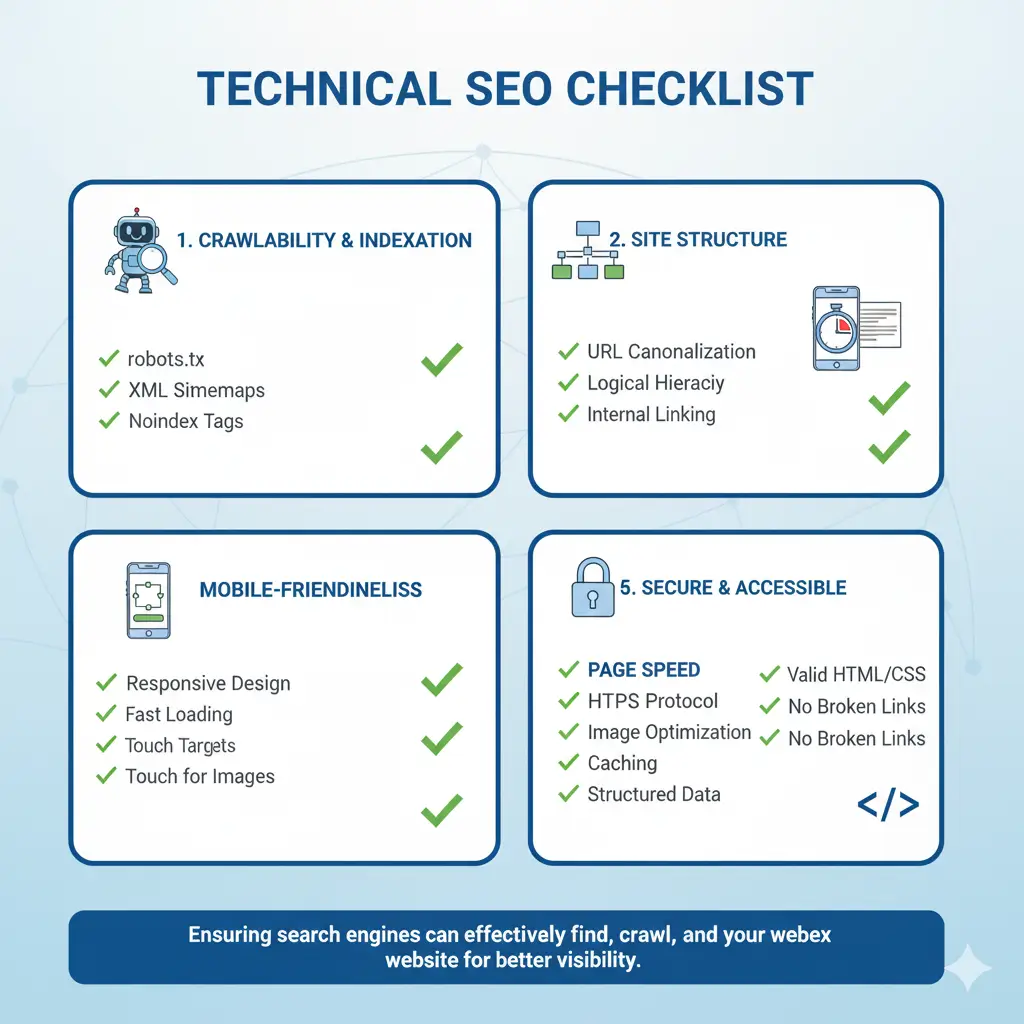
Technical SEO: The Foundation Every Website Needs
Remember when we talked about On-Page SEO being the cockpit where you’re in control? Well, Technical SEO is the engine room – and if your engine is broken, no amount of fancy cockpit controls will get your website off the ground.
I once worked with a client who had amazing content, great backlinks, and perfect on-page optimization. Yet, they couldn’t crack the top 50 for their target keywords. After a technical audit, we discovered their site was being blocked from crawling by a single line in their robots.txt file. One line of code was costing them thousands in potential revenue.
That’s the power (and danger) of Technical SEO. It’s the behind-the-scenes work that makes everything else possible. In this guide, we’ll demystify the technical side and give you a actionable blueprint to build a rock-solid foundation.
What Exactly is Technical SEO? (And Why Should You Care?)
Technical SEO refers to the process of optimizing your website’s infrastructure so search engines can crawl, index, and understand your content efficiently.
Think of it this way: If your website were a physical store:
On-Page SEO would be your window displays and product descriptions
Off-Page SEO would be your reputation and word-of-mouth
Technical SEO would be your store’s layout, lighting, and accessibility
Why Technical SEO is Non-Negotiable
It’s the Foundation: You can have the world’s best content, but if search engines can’t access it or understand it, you won’t rank.
It Impacts User Experience: Technical issues like slow loading times and mobile unfriendliness directly affect how users interact with your site.
It Scales: Fixing technical issues once benefits your entire site, unlike content creation which happens page by page.
It’s Becoming More Important: With Core Web Vitals now being ranking factors, Google is putting more emphasis than ever on technical performance.
Crawlability: Can Search Engines Even Find Your Content?
Before search engines can rank your content, they need to be able to find it. This process is called crawling.
Robots.txt: The Doorman of Your Website
Your robots.txt file tells search engine crawlers which parts of your site they can and cannot access.
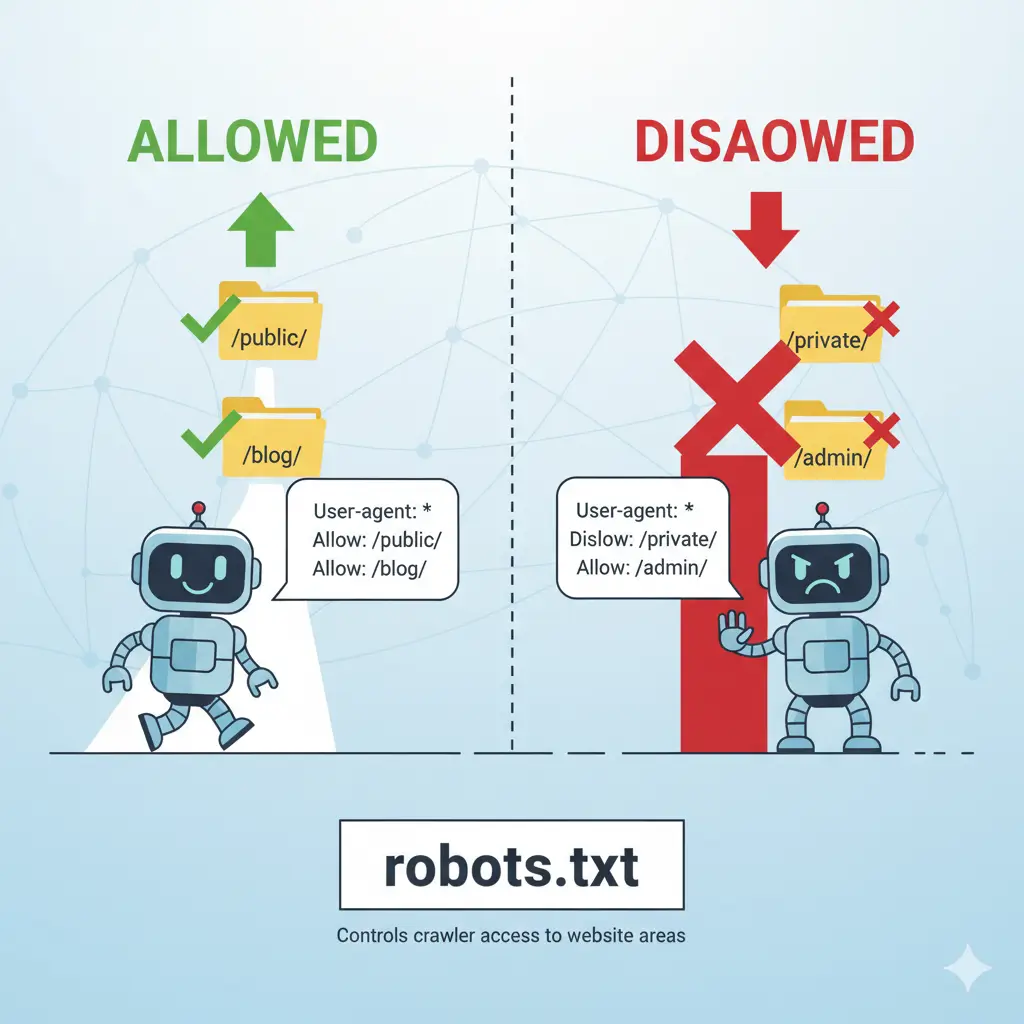
Common Robots.txt Mistakes:
Accidentally blocking CSS or JavaScript files
Blocking entire sections of your site unnecessarily
Having syntax errors that confuse crawlers
XML Sitemaps: Your Site's Table of Contents
An XML sitemap is a file that lists all the important pages on your website, helping search engines discover and prioritize your content.
Best Practices for XML Sitemaps:
Include only canonical URLs (no duplicates)
Focus on important, indexable pages
Keep sitemaps under 50,000 URLs
Submit via Google Search Console
Update regularly when you add new content
Indexability: Making Sure Your Pages Can Be Added to Search Results
Just because a page can be crawled doesn’t mean it will be indexed. Indexability ensures your pages make it into Google’s database.
Meta Robots Tags: Direct Instructions for Search Engines
These tags give specific instructions to search engines about how to handle your pages.
| Tag | What It Does | When to Use |
|---|---|---|
| index, follow | Default - allows indexing and link following | Most pages |
| noindex | Prevents page from being indexed | Thank you pages, private content |
| nofollow | Tells bots not to follow links | User-generated content, paid links |
| noindex, nofollow | Prevents both indexing and link following | Login pages, sensitive areas |
Canonical Tags: Solving Duplicate Content Issues
Canonical tags tell search engines which version of a page is the “master” copy when you have similar or duplicate content.
Common Duplicate Content Scenarios:
HTTP vs HTTPS versions
WWW vs non-WWW
URL parameters (?sort=price, ?color=blue)
Paginated pages (/blog/page/1, /blog/page/2)
Site Architecture: Building a Logical Structure
Your site’s architecture affects both user experience and SEO performance. A logical structure helps users find what they need and helps search engines understand your content hierarchy.
URL Structure Best Practices
Keep URLs:
Simple and readable
Keyword-rich but not stuffed
Consistent in structure
Lowercase with hyphens as separators
Good vs. Bad URL Examples:
| Good URLs | Bad URLs |
|---|---|
| site.com/blue-running-shoes | site.com/product.php?id=483 |
| site.com/blog/seo-tips | site.com/category/p=32?id=blog |
| site.com/services/technical-seo-audit | site.com/services/technical_seo_audit |
Internal Linking Structure
Simple and readable
Keyword-rich but not stuffed
Consistent in structure
Lowercase with hyphens as separators
Internal Linking Best Practices Table:
| Practice | Why It Matters | Example |
|---|---|---|
| Use Descriptive Anchor Text | Helps Google understand linked pages | "Learn about technical SEO audits" |
| Link Deep | Don't just link to homepage and contact page | Link to relevant blog posts and service pages |
| Create Topic Clusters | Group related content together | Link all SEO articles to each other |
| Use Natural Context | Place links where they make sense | Include links within content, not just in footers |
Site Speed: Why Every Second Counts
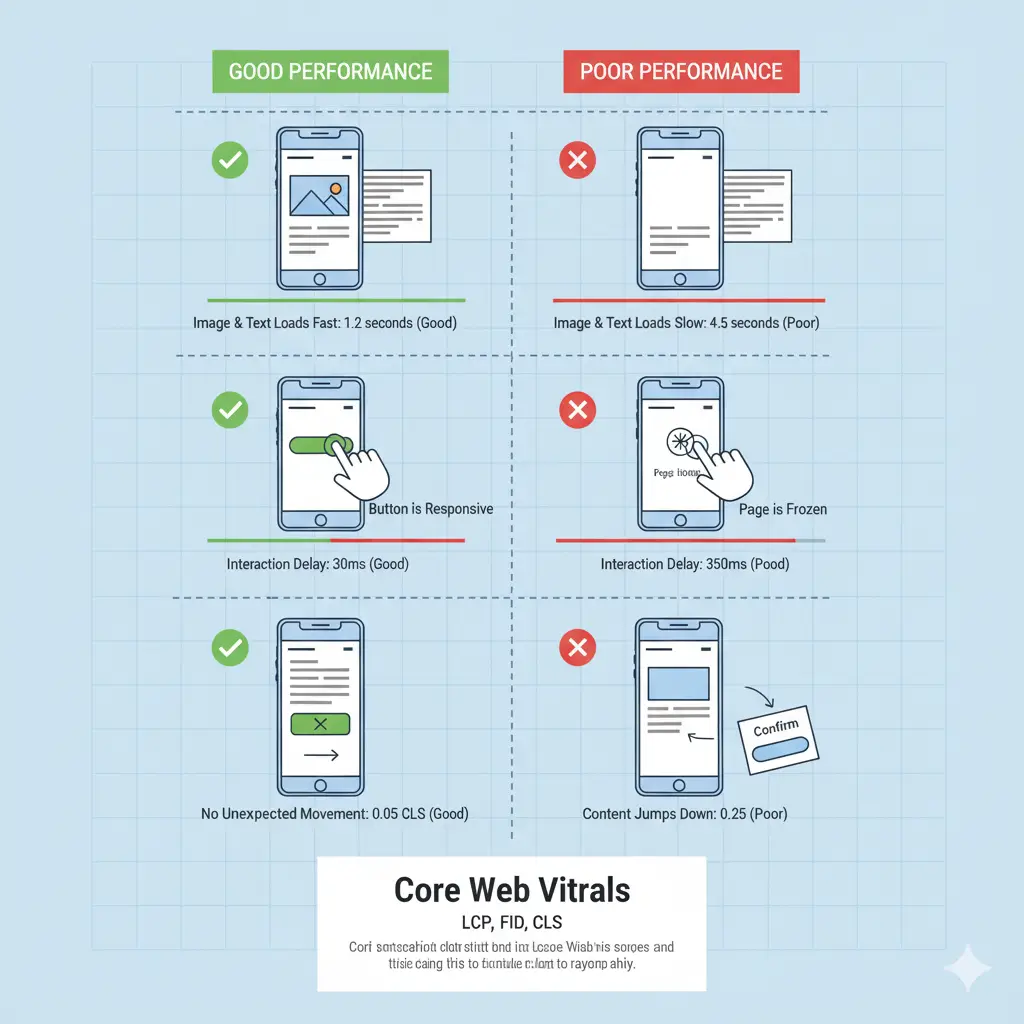
53% of mobile users abandon sites that take longer than 3 seconds to load. Beyond user experience, site speed is now a direct ranking factor through Core Web Vitals.
Core Web Vitals: Google's User Experience Metrics
Largest Contentful Paint (LCP): Measures loading performance
Good: 2.5 seconds or faster
Needs Improvement: 2.5-4 seconds
Poor: Over 4 seconds
First Input Delay (FID): Measures interactivity
Good: 100 milliseconds or less
Needs Improvement: 100-300 milliseconds
Poor: Over 300 milliseconds
Cumulative Layout Shift (CLS): Measures visual stability
Good: 0.1 or less
Needs Improvement: 0.1-0.25
Poor: Over 0.25
Practical Speed Optimization Strategies
Image Optimization:
Compress images before uploading
Use modern formats like WebP
Implement lazy loading
Specify image dimensions
Code Optimization:
Minify CSS, JavaScript, and HTML
Remove unused code
Defer non-critical JavaScript
Use efficient CSS selectors
Server Optimization:
Use a Content Delivery Network (CDN)
Enable browser caching
Use efficient hosting
Implement Gzip compression
Mobile-First Indexing: No Longer Optional
Google now uses the mobile version of your site for indexing and ranking. If your site isn’t mobile-friendly, you’re essentially invisible in search results.
Mobile SEO Checklist
Responsive Design: Site adapts to different screen sizes
Touch-Friendly Elements: Buttons and links are easy to tap
Readable Text: No zooming required to read content
Proper Viewport Configuration: Meta viewport tag implemented
Fast Mobile Load Times: Optimized for mobile connections
No Intrusive Interstitials: Pop-ups don’t block content
Common Mobile SEO Issues
Tap Target Size: Buttons and links should be at least 44px by 44px to be easily tappable.
Viewport Configuration: Ensure you have the correct meta viewport tag
Content Parity: Make sure your mobile site has the same content as your desktop site.
Structured Data: Speaking Google's Language
Structured data (Schema.org markup) helps search engines understand the context and meaning of your content, potentially earning you rich results in search.
Benefits of Structured Data
Rich Snippets: Enhanced search results with ratings, prices, etc.
Better Understanding: Helps Google comprehend your content
Voice Search Optimization: Essential for voice search queries
Competitive Advantage: Many sites still don’t implement structured data
Common Schema Markup Types
| Schema Type | Best For | Rich Result Features |
|---|---|---|
| Article | Blog posts, news articles | Headline, date published, images |
| Product | E-commerce products | Price, availability, reviews |
| LocalBusiness | Physical business locations | Address, hours, contact info |
| FAQ | FAQ pages | Accordion-style results |
| HowTo | Tutorials and guides | Step-by-step instructions |
Security: HTTPS as a Ranking Signal
Google uses HTTPS as a ranking signal, and modern browsers mark non-HTTPS sites as “not secure.”
HTTPS Implementation Checklist
Get an SSL Certificate: From your hosting provider or services like Let’s Encrypt
Implement Proper Redirects: 301 redirect from HTTP to HTTPS
Update Internal Links: Ensure all internal links use HTTPS
Fix Mixed Content Issues: Ensure all resources load via HTTPS
Update Search Console: Add the HTTPS property to Google Search Console
International SEO: Speaking to Global Audiences
If you serve multiple countries or languages, technical SEO ensures you’re showing the right content to the right audience.
hreflang Tags: Telling Google About Language and Regional Variations
hreflang tags help search engines understand which language and regional version of a page to show searchers.
Technical SEO Audit: Your Step-by-Step Checklist
Use this checklist to perform a comprehensive technical SEO audit of your website:
Crawlability & Indexability
Verify robots.txt isn’t blocking important content
Submit and check XML sitemap in Google Search Console
Check for proper use of meta robots tags
Implement canonical tags where needed
Fix any crawl errors in Search Console
Site Architecture
Ensure clean, SEO-friendly URLs
Check for broken internal links
Verify logical site structure and navigation
Implement breadcrumbs where appropriate
Check for orphaned pages (pages with no internal links)
Performance
Test and optimize Core Web Vitals
Compress and optimize images
Minify CSS, JavaScript, and HTML
Implement browser caching
Set up a CDN if serving global audiences
Mobile Optimization
Test mobile-friendliness with Google’s Mobile-Friendly Test
Ensure responsive design works correctly
Check tap target sizes and readability
Verify viewport configuration
Test mobile site speed
Security & Technical Factors
Implement HTTPS across entire site
Check for and fix mixed content issues
Verify proper use of structured data
Implement hreflang tags if targeting multiple regions
Check for and fix duplicate content issues
Tools for Technical SEO Success
Free Tools:
Google Search Console
Google PageSpeed Insights
Google Mobile-Friendly Test
Screaming Frog SEO Spider (free version)
GTmetrix
Paid Tools:
Ahrefs Site Audit
SEMrush Site Audit
DeepCrawl
Screaming Frog (paid version)
Common Technical SEO Myths Debunked
"My Developer Handles All Technical SEO"
While developers implement technical changes, SEO strategy should guide what needs to be implemented. Collaboration is key.
"Technical SEO is a One-Time Fix"
Websites evolve, Google’s algorithms change, and new technical issues can emerge. Regular audits are essential.
"Site Speed Only Matters for E-commerce"
All sites benefit from faster loading times – including blogs, service sites, and portfolios.
"Mobile SEO is Just Having a Mobile Site"
It’s about providing an excellent mobile experience, not just having a site that works on mobile.
Conclusion: Building Your Technical Foundation
Technical SEO might not be as glamorous as content creation or as exciting as earning backlinks, but it’s the foundation that supports all your other SEO efforts. You can have the best content in the world, but if technical issues prevent search engines from accessing and understanding it, you’ll never see the results you deserve.
The good news? Most technical SEO issues are fixable with the right knowledge and approach. Start with the audit checklist above, tackle the biggest issues first, and watch as your solid technical foundation helps all your other SEO efforts work more effectively.
Ready to see how all the pieces fit together? Now that you understand the technical foundation and on-page optimization, learn how to build your site’s reputation with our guide to Off-Page SEO
Need Professional Help?
Technical SEO can be complex and time-consuming. If you’d rather focus on your business while we handle the technical details, our expert team is here to help.
[Get Your Free Technical SEO Audit] – We’ll identify the technical issues holding your site back and provide a customized plan to fix them.
What’s your biggest technical SEO challenge? Share in the comments below, and our experts will help you solve it!
Pingback: Off-Page SEO: Building Digital Authority in 2025 - runkexpert.com
Pingback: The Definitive Guide to SEO in 2025 - runkexpert.com