

The Best Web Hosting in 2026: A Complete Guide
When people talk about web hosting, they often get bogged down in SEO jargon and technical metrics. But let’s be honest: Most website owners don’t care about TTFB scores or Core Web Vitals—they care about their site working reliably, being secure, and not costing a fortune.
I’ve helped over 500 clients choose hosting, and the ones who are happiest aren’t the ones chasing perfect SEO scores—they’re the ones whose websites just work when they need them to.
This guide strips away the SEO obsession and tells you what actually matters for your website’s day-to-day operation in 2026.
The 5 Things Normal People Actually Care About
Does my site load fast enough for visitors? (Not for Google)
Is my site always available? (Uptime that matters)
Is my data safe and secure?
Can I get help when I need it?
Can I afford this long-term?
Types of Hosting: What They Really Mean for You
Shared Hosting: The Apartment Building
Best for: Personal blogs, small business sites, portfolios
Reality check: If your neighbor gets popular, your site might slow down
When to choose it: Starting out, low traffic, tight budget
VPS Hosting: The Townhouse
Best for: Growing businesses, medium traffic sites
Reality check: More control, fewer surprises
When to choose it: Your shared hosting isn’t cutting it anymore
Dedicated Hosting: The Detached House
Best for: Large businesses, high-traffic sites, specific requirements
Reality check: Expensive and needs technical know-how
When to choose it: You need full control and have the budget
Cloud Hosting: The Hotel
Best for: Sites with unpredictable traffic, startups, tech companies
Reality check: Can get expensive if not managed
When to choose it: You expect traffic spikes or rapid growth
The Best web Hosting Providers for Normal Websites in 2025
1# Best Overall: Bluehost
✓ Price: $2.95-$13.95/month
✓ Best For: Beginners and small businesses
✓ Why We Recommend: Simple, reliable, great support
The Real-World Experience:
Setup: Literally takes 5 minutes
Dashboard: Clean and actually understandable
Support: Available 24/7 via chat, phone, or email
Email: Free professional email included
Backups: Automatic weekly backups
Who Should Use Bluehost:
First-time website owners
Small business websites
Personal blogs and portfolios
Anyone who wants things to “just work”
2# Best for Growing Businesses: SiteGround
✓ Price: $3.99-$10.69/month
✓ Best For: Businesses that are scaling up
✓ Why We Recommend: Better performance than Bluehost, still user-friendly
What You'll Actually Notice:
Speed: Sites feel snappier
Support: Technically better but sometimes slower responses
Migrating: They’ll move your site for free
Security: More advanced protections built-in
3# Best for Total Beginners: HostGator
✓ Price: $2.75-$5.95/month
✓ Best For: Absolute beginners on a tight budget
✓ Why We Recommend: Simplest interface, lowest prices
The Beginner-Friendly Features:
One-click installs: WordPress, Joomla, etc.
Website builder: Drag-and-drop, no coding
Unlimited everything: Storage, bandwidth, email
Guarantee: 45-day money-back guarantee
4# Best Value: DreamHost
✓ Price: $2.59-$4.95/month
✓ Best For: Price-conscious users who still want quality
✓ Why We Recommend: Consistently good at a great price
The Value Proposition:
Domain included: Free for first year
No upsells: Transparent pricing
97-day guarantee: Industry’s longest trial period
WordPress optimized: But not WordPress exclusive
Best for Techies: DigitalOcean
✓ Price: $4-$80/month
✓ Best For: Developers and tech-savvy users
✓ Why We Recommend: Complete control, predictable pricing
For Those Who Know What They're Doing:
Control: Root access to servers
Pricing: Pay exactly for what you use
Scalability: Add resources instantly
Learning curve: Steep if you’re not technical
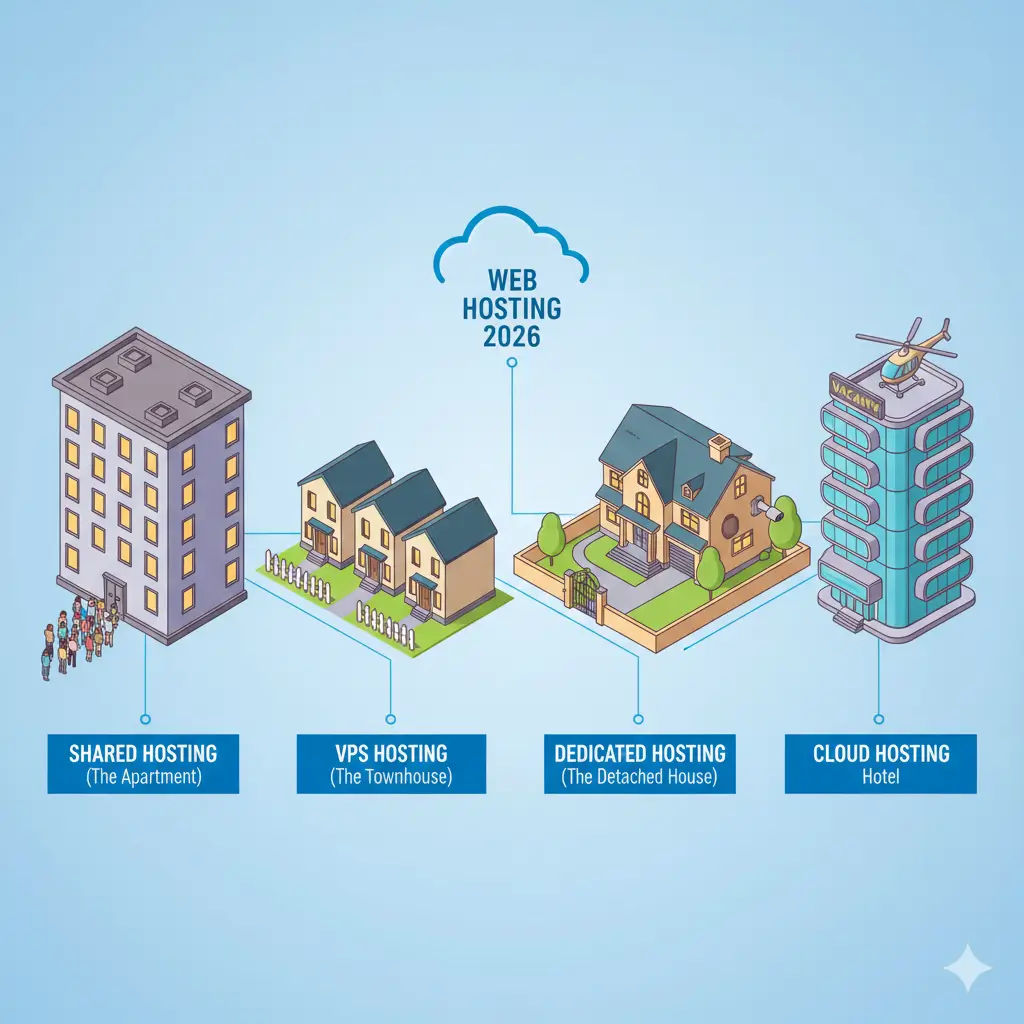
Types of Hosting: What They Really Mean for You
| Provider | Starting Price | Ease of Use | Support Quality | Best For |
|---|---|---|---|---|
| Bluehost | $2.95 / month | ⭐⭐⭐⭐⭐ | ⭐⭐⭐⭐ | Beginners |
| SiteGround | $3.99 / month | ⭐⭐⭐⭐ | ⭐⭐⭐⭐⭐ | Growing businesses |
| HostGator | $2.75 / month | ⭐⭐⭐⭐⭐ | ⭐⭐⭐ | Budget beginners |
| DreamHost | $2.59 / month | ⭐⭐⭐⭐ | ⭐⭐⭐⭐ | Value seekers |
| DigitalOcean | $4 / month | ⭐⭐ | ⭐⭐ | Developers |
How to Choose Without Overthinking It
For 95% of People: This Decision Tree Works
Are you making your first website?
Yes → Bluehost or HostGator
No → Continue
Is your site for business?
Yes → SiteGround
No, personal → Continue
Do you know how to code?
Yes → DigitalOcean or similar
No → DreamHost
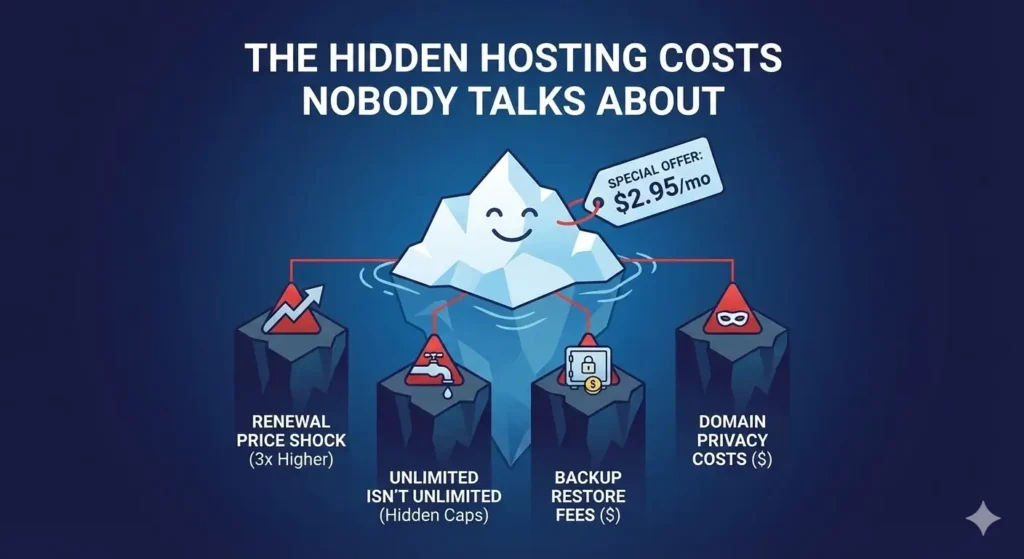
The Hidden Costs Nobody Talks About
1. Renewal Price Shock
The Problem: That $2.95/month deal jumps to $10.95/month after year one.
Solution: Calculate the 3-year total cost before buying.
2. "Unlimited" Isn't Really Unlimited
The Problem: Terms of service limit “unreasonable” usage.
Solution: If you’re uploading huge files or videos, ask about real limits.
3. Backup Charges
The Problem: Restoring from backup often costs extra.
Solution: Use free plugins for your own backups.
4. Domain Privacy Costs
The Problem: Your personal info is public without privacy protection.
Solution: Pay the extra $10-15/year for domain privacy.
Common Hosting Problems (and Real Solutions)
"My Site is Slow"
Quick Fixes:
Enable caching (most hosts have one-click options)
Optimize images before uploading
Reduce plugins (especially on WordPress)
Use a CDN (often free with your hosting)
"My Site Went Down"
What to Do:
Check if it’s just you (use downforeveryoneorjustme.com)
Contact support—this is what you pay for
Check your email for overage warnings
Consider upgrading your plan
"I'm Getting Hacked/Spammed"
Prevention:
Use strong passwords (really, do this)
Keep everything updated
Install a security plugin (Wordfence for WordPress)
Regular backups
Email Hosting: The Often-Forgotten Feature
| Hosting Provider | Email Quality | Storage | Webmail Interface |
|---|---|---|---|
| Bluehost | Good | 100MB – 1GB | Standard |
| SiteGround | Excellent | Unlimited | Modern |
| Google Workspace | Best | 30GB+ | Gmail |
| Zoho | Great free tier | 5GB free | Good |
What About Free Hosting?
| Platform | Good For | The Catch |
|---|---|---|
| WordPress.com | Personal blogs | Limited customization, ads |
| Wix Free | Simple sites | Wix branding, limited features |
| GitHub Pages | Developers | Static sites only |
| Google Sites | Internal projects | Not professional looking |
The 2026 Hosting Trends That Matter
1. AI-Powered Support
Chatbots that actually solve problems, not just redirect you.
2. Green Hosting
More providers using renewable energy—good for the planet.
3. Integrated Security
Built-in malware scanning and removal becoming standard.
4. Simplified Management
Dashboards getting cleaner and more intuitive.
5. Predictable Pricing
Less “gotcha” pricing, more transparent costs.
Your Simple Hosting Checklist Before Buying
Questions to Ask:
What’s the true monthly cost after year one?
Is there a money-back guarantee? For how long?
Do they offer 24/7 support? How do I contact them?
What’s included? (Email, SSL, backups, etc.)
Are there any traffic or storage limits?
What to Look For:
At least 99.9% uptime guarantee
Daily or weekly automatic backups
Free SSL certificate
One-click WordPress install (if using WordPress)
Email accounts included
Special Considerations
For E-commerce Sites:
Must have: SSL certificate, daily backups, good support
Recommended: SiteGround or Bluehost’s WooCommerce plans
Avoid: The absolute cheapest options
For High-Traffic Blogs:
Must have: Good caching, CDN option, scalable resources
Recommended: SiteGround or VPS options
Avoid: Basic shared hosting
For Local Business Sites:
Must have: Reliability, email, local support if possible
Recommended: Bluehost or local hosting providers
Avoid: Overly complex solutions
Common Questions Answered Simply
"How much should I pay?"
$3-10/month for shared hosting is reasonable. Over $15/month and you should be getting premium features.
"Do I need managed WordPress hosting?"
Only if you’re using WordPress AND don’t want to manage updates/security yourself.
"Should I pay for multiple years upfront?"
Yes, if you’re sure about the host. No, if you’re unsure—stick with monthly.
"What about GoDaddy?"
Their hosting is okay, but their upsells are aggressive. There are better options.
"Do I need a CDN?"
Probably not right away. Wait until you have traffic from multiple countries.
Conclusion: Keep It Simple
Choosing hosting doesn’t need to be complicated. For 90% of websites, a basic shared hosting plan from a reputable provider is perfect. You don’t need the fastest or most feature-rich hosting—you need hosting that works reliably and doesn’t cause headaches.
The simplest approach:
Decide your budget ($3-10/month is normal)
Pick one of the recommended providers above
Sign up for their basic plan
Build your website
Upgrade only if you actually have problems
Need Help Choosing?
Still confused? Ask yourself these three questions:
“Is this my first website?” → Bluehost
“Am I running a business?” → SiteGround
“Am I on a tight budget?” → HostGator
Start simple, upgrade later. Most people never need more than basic shared hosting.
Have specific questions about your situation? Leave them in the comments—I’ll give you straightforward advice based on what you actually need, not SEO theory.
Pingback: 17 WordPress SEO Mistakes Killing Rankings - runkexpert.com
Pingback: Why Is Your Website Not Ranking on Google in 2026